
How to verify a company with an STI-025 registration card
Download the STI-025 taxpayer registration card from your tax account and upload it to DevKG. The site checks it automatically. After a successful check, a green “Verified company” checkmark appears beside the company name.
STI-025 is a Kyrgyzstan tax service document containing the taxpayer's name, tax ID and QR code. The tax ID, called INN, identifies the company or sole proprietor. The QR code is a square pattern containing a link the site uses to retrieve the tax service document for comparison.
What you need
- Your company's or sole proprietor's PDF card. Download it from the taxpayer account. If an accountant manages the account, ask them to send you the downloaded file.
- A company profile on the site. If there is none, create a company.
- Permission to edit the company. Administrators and members with the “Edits company” permission can verify it. Ask an administrator for help if needed. See Company members.
Which file to use
Use the original PDF, up to 8 MB, downloaded from the taxpayer account. It must contain text and the tax service's QR code. Photos, scans and screenshots do not qualify, even if saved as a PDF.
- Works: STI-025.pdfA PDF downloaded from your account on cabinet.salyk.kg — works
- Does not work: scan.pdfA scan of a printout — does not work: it holds only a picture, no text
- Does not work: photo.jpgA photo or a screenshot — does not work: it must be a PDF
- Does not work: STI-025-2023.pdfAn old card — does not work if the details have changed since. Download a fresh one
The filename alone proves nothing. The site compares the tax ID and name in the file with the document retrieved through the QR code. If you have an old card, download it again.
Step 1. Download the STI-025 registration card
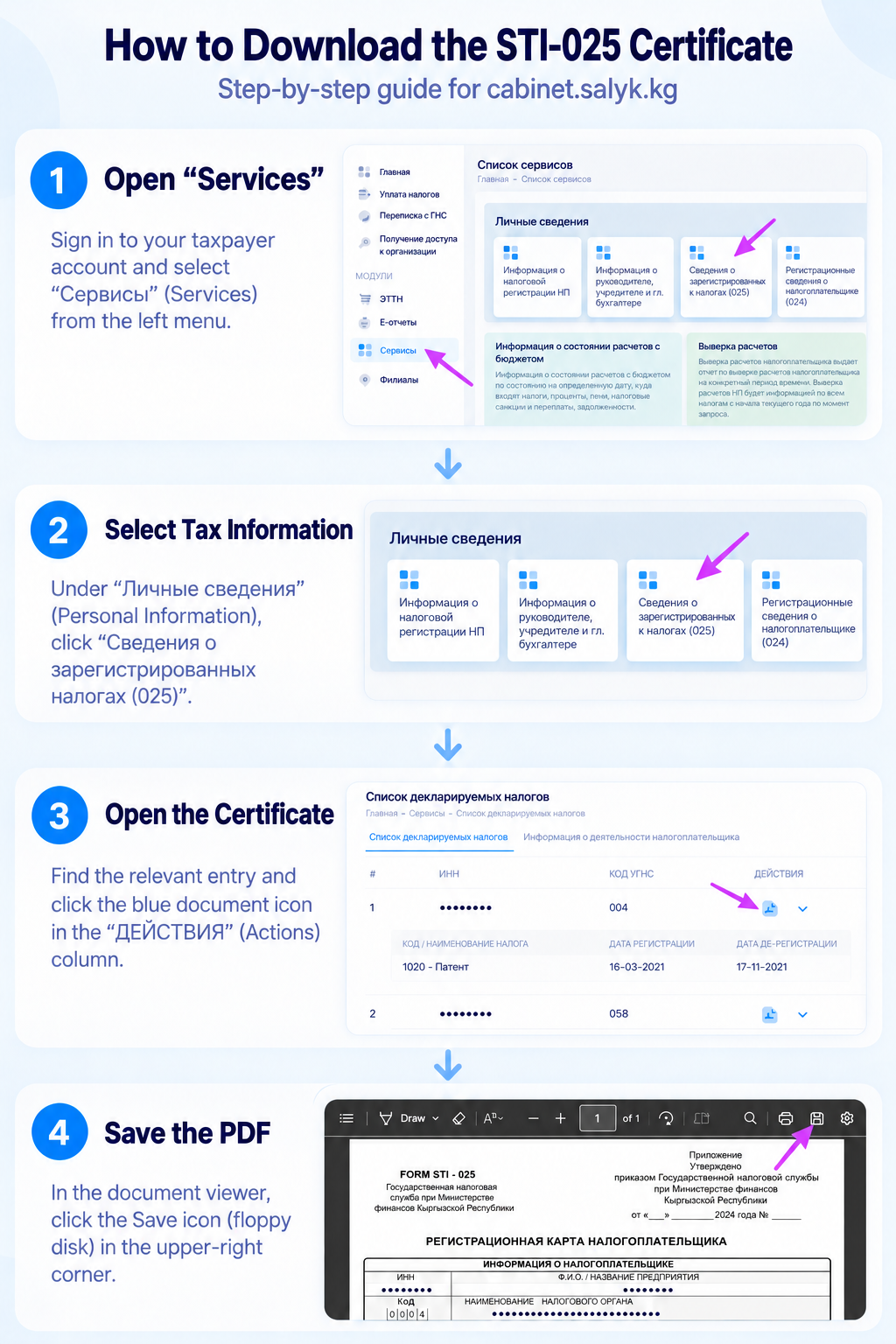
- Open cabinet.salyk.kg and sign in to the account for the relevant company or sole proprietor.
- Select Services (“Сервисы”) in the menu.
- Under Personal information (“Личные сведения”), find the registered-tax information card marked 025. Use the number rather than the card's position. The neighbouring 024 form is not the one you need.
- Find the relevant taxpayer's entry and click the document icon in the Actions column.
- Check the name and tax ID in the document: they must belong to the company or sole proprietor whose profile you are verifying. If you are unsure which entry to choose, ask your accountant.
- Click Save or Download in the PDF viewer. The illustration shows a floppy disk icon in the top right. Your browser may use a different icon.
Remember where you saved the file. It is often in Downloads. Check that it is a PDF up to 8 MB, headed “FORM STI-025” / “Регистрационная карта налогоплательщика”, and includes a QR code.
Step 2. Open company verification
- Go to My companies.
- Choose the company.
- Open the Verification tab.
- Select Taxpayer registration card.
If this method is missing, choose another available method or contact support.
Step 3. Upload the PDF and submit it
- Click Choose a PDF and find the saved file. On a computer, you can also drag it into the upload area.
- Check that the correct filename appears.
- Click Submit for verification.
- While the button says Checking…, stay on this page and wait for the result.
No moderator is needed. The site reads the card and compares it with the tax service document retrieved through its QR code. The response time also depends on the tax service being available.
How to tell that verification succeeded
After a successful check, you will see a company verification confirmation. The Verification tab will show the method, legal name, tax ID and verification date.
The green checkmark appears beside the company name on its page and publications. Verification applies across the platform's sites where the company is listed.
The name and tax ID are also filled into the company's billing details. You cannot edit these two fields yourself after verification. If they need correcting, contact support.
If verification was required to post a job, you can now return to publishing it. The site's other requirements still apply. See Why company verification is required.
If verification fails
Read the message below the upload field to choose your next step.
| What you see | What to do |
|---|---|
| The PDF is a scan or photo with no text | The site could not read the required data. Upload the original STI-025 PDF from the account, not a scan or image. |
| No QR code found | Check that you selected STI-025 and the entire QR code is visible. Download the original file again. |
| The QR code does not link to qr.salyk.kg | Its link cannot be used for this check. Download the card again from the taxpayer account. |
| The file cannot be opened as a PDF | Download it again. Renaming an image to .pdf does not turn it into a PDF. |
| The file was rejected | Check that it is a PDF up to 8 MB. Use the original file from the account instead of compressing or converting it. |
| The file data does not match the registry | The name or tax ID differs from the tax service document linked by the QR code. Download a fresh card without editing it. Contact support if the error continues. |
| This tax ID is already verified for another company | The ID is linked to another profile on the platform, possibly created by a colleague. Check the company directory or contact support. |
| The tax service registry is unavailable | The site could not retrieve the document for comparison. Try again in a few minutes. |
| Too many attempts | Wait a minute and try again. |
| You do not have permission | Ask an administrator to verify the company or give you permission to edit it. |
| The company is already verified | No further check is needed. |
If you still need help, contact support with the company name and error message.
Cannot access the taxpayer account?
Ask your accountant for the original STI-025 PDF, or verify the company using a work email on its website's domain. Follow How to verify a company with a corporate email.
Common questions
Can a sole proprietor use this method?
Yes. If you have an STI-025 card as a sole proprietor, upload it for the corresponding profile. The document must pass the same checks.
Who can see the uploaded PDF?
The file is kept in private storage and is not displayed to visitors in publications. The legal name and tax ID are used for company verification and billing details.
Does the checkmark guarantee a reliable employer?
It indicates completed verification. With this method, the site compares registration card data with the tax service document. It does not assess working conditions or guarantee that the employer will keep its promises.
Was this article helpful?
Can't find an answer? Contact support
- How to verify a company with a corporate emailFind out which email address to use, how to get the green checkmark, and what to do if the verification code does not arrive.
- How to create a company and complete its profileAdd a company on DevKG, complete its profile, verify it, invite colleagues and save billing details.
- Company members — invite colleagues and set access rightsInvite a colleague by email, choose their rights and accept an invitation. Learn how to approve posts, remove members and leave a company.